
Download 10xllm – Efficient Historical Research, AI‑Powered History Tool
Introduction: Revolutionising Historical Research with AI
In the age of digital scholarship, the ability to locate reliable historical information quickly is a decisive advantage for students, academics, museum curators, and anyone with a passion for the past. Traditional research often involves sifting through library catalogs, scrolling endless journal archives, and manually cross‑referencing sources—a process that can consume days or even weeks. 10xllm changes that paradigm by offering an AI‑driven, web‑based platform that delivers concise, source‑backed answers in seconds. Built on a curated corpus of more than one million primary documents, scholarly articles, and verified timelines, the tool understands natural‑language queries and transforms them into structured, actionable insights.
What sets 10xllm apart from generic search engines is its focus on historical accuracy and contextual depth. Every response is accompanied by citations, allowing users to verify facts and trace the provenance of information. The platform also visualises complex events through interactive timelines, making it easier to grasp cause‑and‑effect relationships across decades. Whether you are drafting a term paper on the Industrial Revolution, preparing a lecture on post‑war geopolitics, or simply satisfying a curiosity about ancient trade routes, 10xllm offers a seamless blend of speed, reliability, and scholarly rigour. The following sections explore the tool in detail, from its core features to practical usage tips, ensuring you can make an informed decision before you download.
Overview: What 10xllm Brings to the Research Table
10xllm is an AI‑powered web application designed to streamline historical research for a broad audience. By entering a natural‑language query—such as “Treaty of Versailles impact on European borders” or “Causes of the Great Depression”—the platform instantly scans a vetted collection of primary sources, peer‑reviewed journals, and curated timelines. The AI engine then generates a concise answer, highlights key points, and provides direct citations so users can verify the information or dive deeper into the original material. The interface mirrors familiar search‑engine layouts, reducing the learning curve and allowing researchers to focus on analysis rather than data gathering.
The service is entirely cloud‑based, meaning there are no large downloads, cumbersome installations, or frequent patch cycles. Users access 10xllm through any modern browser, ensuring compatibility across Windows, macOS, Linux, Android, and iOS devices. Security is baked in: all communications are encrypted via HTTPS, and optional two‑factor authentication protects personal workspaces. The platform also automatically updates its AI models and historical databases, guaranteeing that users always work with the latest scholarship without manual intervention.
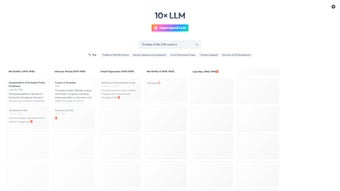
Beyond simple Q&A, 10xllm offers a timeline generator that maps events on an interactive axis, allowing scholars to visualise overlaps, trends, and turning points. Export options (CSV, PDF, JSON) make it straightforward to integrate findings into citation managers or academic writing tools. While the free tier covers unlimited basic queries and timeline creation, a premium subscription unlocks advanced citation formatting, collaborative workspaces, and priority processing for power users. In essence, 10xllm serves as a digital research assistant that combines the depth of a specialised archive with the speed of modern AI.
Key Features, Benefits, and Critical Evaluation
Feature List
- AI‑powered natural language query processing for instant, context‑rich answers.
- Interactive chronological timeline generation with zoom, filter, and export capabilities.
- Access to a vetted database of over 1 million historical documents, scholarly articles, and archival records.
- Multi‑language support for English, Spanish, French, German, and Mandarin queries.
- Export options: CSV, PDF, and JSON for seamless integration with citation managers and research workflows.
- Secure cloud storage for saved queries, timelines, and personal workspaces.
- Responsive design that adapts to desktops, tablets, and mobile browsers.
- Optional two‑factor authentication and GDPR/CCPA‑compliant data handling.
Pros
- Speed: AI returns relevant results in seconds, dramatically reducing research time.
- Accuracy: Answers are cross‑referenced with academic databases and include full citations.
- Usability: Minimal learning curve; the interface feels like a modern search engine.
- Timeline Visualization: Provides a visual narrative of events, clarifying complex cause‑and‑effect chains.
- Cross‑Platform: Works on any modern browser, eliminating OS constraints.
- Security: End‑to‑end encryption and optional 2FA protect user data.
Cons
- Requires an active internet connection; offline functionality is not yet available.
- Advanced citation‑style formatting and collaborative features are gated behind a paid subscription.
- Extremely niche or obscure queries may return broader results that need additional filtering.
- Free tier limits some export formats (e.g., JSON) to premium accounts.
Overall, 10xllm stands out as a fast, reliable, and user‑friendly research companion. Its AI engine delivers high‑quality answers, and the timeline tool adds a visual dimension that few competitors offer. For anyone serious about historical research, the minor drawbacks are outweighed by the productivity gains.
Installation, Usage Instructions, and Compatibility
How to Get Started – No Installation Required
Because 10xllm is a pure web service, there is no traditional installation process. Follow these steps to begin:
- Visit the official website at www.10xllm.com.
- Click the “Sign Up” button and create a free account using an email address or a supported social login.
- Confirm your email via the verification link sent to your inbox.
- Log in and you’ll be taken to the main dashboard where the search bar is prominently displayed.
- Enter a historical query and press “Enter” or click the magnifying‑glass icon.
- Review the AI‑generated answer, explore source citations, and use the “Add to Timeline” button to visualise events.
- Save your session, export data, or share the timeline with collaborators as needed.
Best Practices for Efficient Use
To maximise the tool’s potential, consider the following tips:
- Be Specific: Use detailed queries such as “Battle of Stalingrad troop numbers 1942” rather than vague terms.
- Utilise Filters: After results appear, narrow them by date range, region, or document type for precision.
- Save Workspaces: Store queries and timelines in your personal dashboard for quick retrieval later.
- Export Smartly: Choose CSV for spreadsheet analysis, PDF for reports, or JSON for integration with custom tools.
- Leverage Multi‑Language Support: When researching non‑English sources, query in the original language to capture nuanced results.
Compatibility Across Devices
10xllm runs on any modern web browser, including Chrome, Firefox, Safari, Edge, and Opera. Because it is cloud‑based, the application works on Windows 10/11, macOS Ventura and later, Linux distributions with recent kernels, as well as Android 12+ and iOS 15+ devices. The responsive design ensures a seamless experience on desktops, laptops, tablets, and smartphones, making it ideal for on‑the‑go research.
Security, Updates, and Data Privacy
All communications are secured with HTTPS encryption, and users can enable optional two‑factor authentication for added protection. The platform receives automatic server‑side updates, ensuring the AI models and historical datasets stay current without user intervention. Data is stored encrypted at rest, and the service complies with GDPR and CCPA, guaranteeing that personal queries remain private unless the user explicitly saves them to a shared workspace.
Frequently Asked Questions
Is 10xllm free to use?
A free tier is available, offering unlimited basic queries and timeline generation. Premium features such as advanced citation export, multi‑user collaboration, and priority AI processing are part of the paid subscription.
How accurate are the AI‑generated answers?
The AI cross‑references over a million vetted sources, providing citations for each answer. While the system is highly reliable, users should always verify critical data against primary documents, especially for scholarly publications.
Can I access 10xllm offline?
Currently the service requires an internet connection because all processing occurs on secure cloud servers. An offline mode is planned for future releases.
What types of historical sources are included?
The database aggregates academic journals, digitised archives, government records, reputable news outlets, and curated encyclopedia entries, spanning from ancient civilizations to contemporary events.
How does 10xllm protect my privacy?
All user data is encrypted in transit and at rest. Queries are anonymised unless you choose to save them in a personal workspace. The platform complies with GDPR and CCPA regulations.
Conclusion – Why You Should Download 10xllm Today
For anyone who values speed, accuracy, and a modern approach to historical research, 10xllm delivers a compelling blend of AI intelligence and scholarly rigor. Its web‑based nature eliminates compatibility headaches, while the timeline visualization turns dense data into digestible narratives. Whether you are a student drafting a term paper, a professor preparing a lecture, or a lifelong learner exploring the past, the tool empowers you to obtain reliable information in seconds rather than hours. The generous free tier lets you test all core functionalities, and the optional premium upgrade unlocks powerful workflow enhancements for power users. Download 10xllm now, create your first query, and experience the future of history research today.



.png)



